Montag, 25. Januar 2016

xrandr-tui

So, you want to change your screen resolution?
Have added a new LCD to your laptop and want to switch the displays?

Depends on: (xorg -)xrandr, bash and TUI (0.9.4-5 or later) (Website, Download, Install)

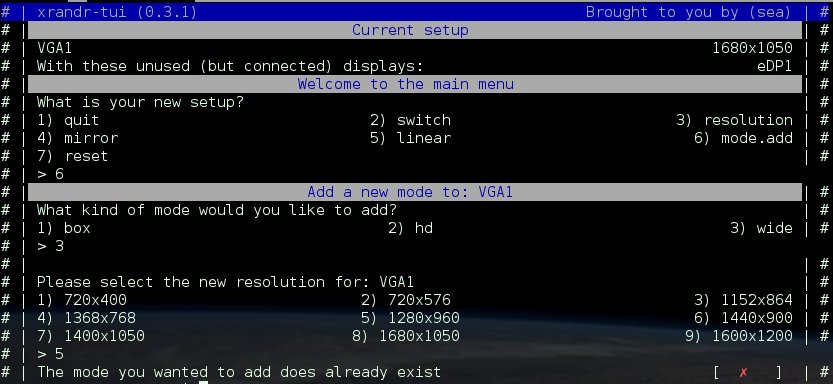
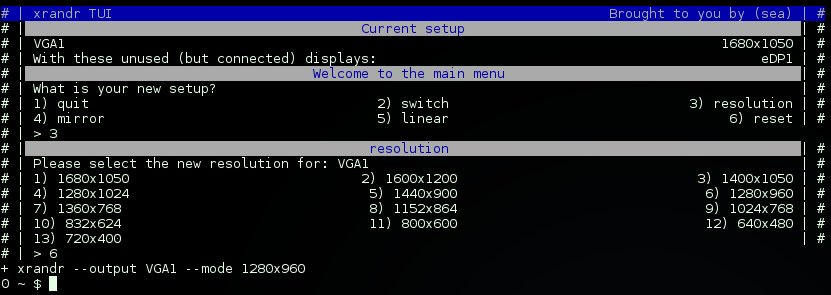
Have a look at xrandr-tui, if you do not want to type in those commands:

More functions are planned for the future, but first some optimizations for what currently is have to be applied.

It is meant for the use with WMs (Awesome, I3,dwm, etc) as it lets you set a base config, which will be used for:

xrandr-tui --switch
xrandr-tui --reset
xrandr-tui --mirror
Keep in mind, calling xrandr-tui by itself, will let you customize the task every time.
Whereas the quickaccess (arguments) will rely on the configuration file.
The screenshots you see here, are from xrandr-tui called without arguments.

You can even add and remove new/old resolutons:

Links

Sonntag, 24. Januar 2016

Change brightness of Screen

Well, beeing all about scripts here, got a new one:

The script is also a wrapper wether you have (xorg-)xbacklight installed or not, but if not, it requires sudo to be passwordless for the user (if called by a WM/without using terminal).

#!/usr/bin/env  bash
# Description:    Change brightness of laptop lcd
#        This script is part of my AwesomeWM configuration (https://github.com/sri-arjuna/awesome)
#        The most recent version should be available on: https://raw.githubusercontent.com/sri-arjuna/awesome/master/scripts/brightness.sh
# Disclaimer:   This code comes without any warrenty of any kind, use at your own risk!
# GNU General Public License (GPL) 2016 by Simon Arjuna Erat (sea) (erat.simon æ gmail,com)
#
#
#    Variables
#
    BASE=/sys/class/backlight
    ITEM=$(cd $BASE;ls)
    DIR=$BASE/$ITEM
    FILE=$DIR/backlight
    MAX=$(<$DIR/max_backlight)
    STEP_COUNT=20
    STEP_VALUE=$(( $MAX / $STEP_COUNT ))
    CUR=$(<$FILE)
#
#    Action
#
    if which xbacklight 2>/dev/null >&2
    then    # xbacklight is installed
        #cur=$(xbacklight)
        #cur=${cur/\.*}
        case "${1,,}" in
        "")    echo "Usage: brightness.sh up|down"
            exit 1
            ;;
        up)    xbacklight -inc 20
            ;;
        down)    xbacklight -dec 20
            ;;
        esac
    else    # Fallback, dont like the use of sudo in a background script
        # Required/recomend passwordless sudo, but is a security risk!
        case "${1,,}" in
        "")    echo "Usage: brightness.sh up|down"
            exit 1
            ;;
        up)    num=$(( $CUR + $STEP_VALUE ))
            [ $num -ge $MAX ] && num=$MAX
            [ $num -le 0 ] && num=0
            sudo tee $FILE <<< $num
            ;;
        down)
            num=$(( $CUR - $STEP_VALUE ))
            [ $num -ge $MAX ] && num=$MAX
            [ $num -le 0 ] && num=0
            sudo tee $FILE <<< $num
            ;;
        esac
    fi

Freitag, 22. Januar 2016

Awesome WM - MPD

Yeah finaly i got it working!
Took me only like 3 years to rework my original AwesomeWM configuration, and now, i'm almost done.

Currently just so happy about mpd finaly working, that i've added some tweakings for it...

When left clicking on the artist/title, mpc volume rises by 25, right click, lowers by 25.Mousewheel up increases mpc volume by 10, mousewheel down lowers by 10.

Click on the icon to get the playlist menu, with basic commands (in case the laptop is docked and i dont have 'fn'-key) for playback.
Anyhow, selecting any entry of the playlists, starts playing that directly.


CTRL+F4 (doesnt reckognize fn+f4) spawns an xrandr script, to change res/displaymonitor.
CTRL+F5, toggles the laptops touchpad
CTRL+F12 spanws my 'connect' script, for wifi.

The last thing i'm working on now, is to alarm when when/if battery drops below 10%, to get an annoying warning and reminderto plug in the power cord.

The complete config is found at: https://github.com/sri-arjuna/awesome
Enjoy and have a nice weekend!

Montag, 14. Dezember 2015

GNU rejected TUI, for the moment

Hello everyone

As TUI can show its true power only when it is already installed on your system, so one could simply share the scripts that  rely on TUI, just like one shares any bash or other shell script, I wanted to become part of GNU.

That is no easy task, specialy if you come from a 4 year old project that hasnt had this goal from start.
So, for the past 10 months, its been in the GNU Evaluation queue and just until a day ago it look very promising.

However, it got rejected for the moment, as more user feedback is wanted for them to evaluate the need/profit of making TUI part of the GNU family.

With one of the arguments beeing that we would need some user feedback for further evaluation.

That is, because TUI has a new approach to the terminal...
An approach mainwhile quite the same, but also quite different.

In the beginning, I wanted the 'ultimate' dir/menu browser for (a single specific) directory based script project/s.
In the end I extracted those functions as I wanted to have the scripts provided in named directories to look/match the containing 'ultimate' menu, so I made them individual commands.

Due to this change, one can also create great (single file) wizzards or wrappers around other cli/clu applications or make tools that act (but dont look like) 'ip' or 'iw' commands, just for your custom directory-tree structure.

It comes with many commands/functions for often used tasks, such as tui-yesno, tui-select, tui-read, as well as nice optical commands such as tui-header and tui-title.

As it is a command and line-based-output framework, it might look weird if you just try a single command.
To get started - once installed, you might want to check:
tuirc samples
tuirc provides
To get the manual, please check either:
info tui
tuirc info
tuirc html  # Only if you used "make install all"
I'm asking here for this required feedback:
  • Which OS/Distro?
  • Does Installer work?
  • Does running 'tuirc' raise any, and if - what kind of - error messages? (Besides initial creating of user configuration)
  • Any other errors/bugs/unexpected behaviour you came along?
Additionally according to your skill, time and preferences:
  • What are our thoughts about the 'tuirc samples'  and info page?
  • Did you find any security bugs? - have any advice how to fix them?
Get it from: https://savannah.nongnu.org/projects/tui/
Issue is, all i can say for sure is that it runs well on my system.
I'd very much like to have confirmed reports on which OS or Distro it installs and runs well or not.
That is also required to get it working for that OS/Distro, eventhough most of them work alike, there are differences i might not be aware to catch and handle (properly) without reports and hints how its done on your OS.

Thank you in advance for sharing your thoughts about TUI.
Freitag, 27. November 2015

VHS 2.6e

The new VHS provides several .desktop files,
  • to ease association to play audio and video files directly from GUI
  • to start screen-, webcam, or guide- recording directly
  • to configure VHS from the settings menu.
Get the latest tarball: https://github.com/sri-arjuna/vhs/releases/tag/v2.6e
Or download from github directly:

git clone https://github.com/sri-arjuna/vhs.git
cd vhs
./configure --prefix=/usr
./make-install

Hope you like it, enjoy!

Samstag, 21. November 2015

Two advanced simple bash menus

Many times one comes along a situation one wants to present a menu.
There are many ways to achieve this, none is wrong, none is right - each has its own value for its own situation.
However, to maintain or extend an existing menu can be hard to manage, at times.

I'd like to present you two of my favorite menu styles/types.
Hope you like them. :)

Variables:

Lets say you have a bunch of lists to handle, that you would like to present as menu...
It takes the variable prefix BUY_ and lists only the 'suffix' as menu content.
Simply add a new variable, and it will be listed in the menu.
Simply rename an existing variable, and as long the prefix BUY_ exists, it will be applied to the menu.
## Uncomment the variable assignments, to extend the menu
## Alll the menu 'management' can be done 'up here'
    BUY_FRUITS="apple banana kiwi"
    #BUY_PROTEIN="steak lenses"
    #BUY_DRINK="water milk limo"

## Expand/List all variables starting with BUI_
    MENU="${!BUY_*}"

## Loops the menus
while :;do
    echo "What variable to expand?"
   
    ## Cut of BUY_ from all (//) items of the list MENU
    select item in ${MENU//BUY_} Quit;do break;done
   
    ## Let the user Quit the loop
    [ Quit = $item ] && break
   
    ## RE-append the leading BUY_ variable prefix
    sel_item=BUY_$item
   
    ## Finaly expand / list the content of sel_item (BUY_$item).
    ## These 2 echo's should replace your function
    echo "${!sel_item}"
    echo
done

Array:

Lets say you have a bunch of tasks which you want to describe, and you know you might require to change the description.
This way, you only need to change the description in the array, and it keeps working.

    # Make sure no entries remain from possible previous runs
    unset MENU
   
    # Fill the values
    MENU[0]="First menu entry"
    MENU[1]="Menu entry one"
    MENU[2]="All good things are three"
   
    # Let the user select
    select choice in Quit "${MENU[@]}";do
        # Act accordingly
        # Its recomended to call functions from here, so the menu remains 'over-see-able'
        case "$choice" in
        Quit)        break        ;;
        "${MENU[0]}")    echo "first"    ;;
        "${MENU[1]}")    echo "second"    ;;
        "${MENU[2]}")    echo "third"    ;;
        esac
    done
Have fun tweaking!

Dienstag, 29. September 2015

Almost there...

Oh yeah, i'm happy already, allthough it has not yet passed evaluation.

What i'm talking about?
I'm talking about TUI - Text User Interface for scripts, which has reached 0.8.9-GNU-RC16 yesterday evening, and if everything works out as expected, it will reach "GNU TUI 0.9.0" this week.

I've been using TUI already for about 3 years for my own 'production', but by now, it has achieved a state that deserves the label 'stable'!

The feedback, so far, has been good and promising.

What to expect when it passes the evaluation?
I plan to move the project home to: http://www.gnu.org/software/tui to share the texinfo manual and to be the first and primary point of announcements regarding it.

Obviously i'll post here about it too, but more in a human-speaking way, and less technical as there.

Oh im so excited, that i just cant hide it...
*dance dance*

Sonntag, 27. September 2015

How to start coding GNU/Linux software

An often asked question is:

How do i start coding for the GNU/Linux community?

Well, assuming you already can write code, we can focus on GNU/Linux specific issues.

First read:
Coding Standards: http://www.gnu.org/prep/standards/html_node/
Translating using gettext: http://www.gnu.org/software/gettext/manual/gettext.html

While preparing your documention:
texinfo: http://www.gnu.org/software/texinfo/manual/texinfo/texinfo.html

Then, with your first example project following those guide lines, go ahead and dig into:
Autconf: http://www.gnu.org/software/autoconf/manual/autoconf.html
Automake: http://www.gnu.org/software/automake/manual/automake.html
These tools will help to compile your project at the enduser side without issues.

I figured the hard way, created a project, and then had to apply (at least some of) these standards afterwards.. which caused lots of unrequired work...


Other than that, try to make something new, not yet another media converter based upon ffmpeg or avutils.
To do so, search the already existing software at:
Of course, just as/for a training project, you can do whatever you like, just dont expect anyone to jump around in that case.

Hope this helps

Montag, 21. September 2015

YASSI 1.0.1 - Final release

I'm happy to announce the final release of YASSI.

YASSI does not need to be installed, unless you want to 'info yassi'.
The project name and version 'yassi'/1.0.1, and both lines with 'Report bugs...' are read from the configuration file,
and therefor will adjust to your project settings.
Not even 2 months ago I had started with this project, and it already provides all the functions i've wanted for it.While I initially started it for another project of mine where i needed to focus on the duty, i wanted to have it as its own project, to use with ther projects.

I do hope you helps you as much as it does for me.

What is YASSI again?

Yet Another Simple Script Installer

What is it for?

It requires a single file to provide all information for an installation custom to your needs,
while staying easy change-able by the end user.

Get it


Donnerstag, 17. September 2015

Funny error message

Been trying to write a task manager for a script, with the recent changes for GNU TUI evalutation, this is an error i've recieved while working on VHS (Video Handler Script, using ffmpeg)...
Wondering if my security concerns were too much... 

The german words means: "Line 224: .. Syntax  Error: Operator expected. (Error causing character is \033[....)"


So basicly, aborting failed because the aborting text string for the user contained a smiley ';)'
While mainwhile the the printing fails due to an unprintable character, escape string.
But the aborting, after all, aborts successfull.

Usualy errors are just annoying, but this one i found rather funny.

BTW, these 3 bugs are fixed now.

Learn about TUI
Learn about VHS

Download them at github.

Dienstag, 8. September 2015

Minimalistic prompt (PS1)

The most usefull and minimalstic command prompt i can imagine for scripters or sys-admins:
PROMPT_COMMAND='RET=$?'
RET_VAL="$(echo $RET)"
export PS1="$RET_VAL \\$ "
If if its within a terminal window, you'll see the path you're in in the task- or titlebar.
If you really want to have the path in your shell, try this line:
export PS1="$RET_VALUE \W \\$ "

Hope you enjoy and have fun!

Montag, 3. August 2015

Yet Another Simple Script Installation

Got a cool script, and now need an installation script?

YASSI helps you :)
Inspired by the powerfull, but complex, GNU Autotool's, i've written this single script to handle this.

Main benefit?
It requires just a single configuration file.

Main drawback?
Its just to place the files, it does NOT do ANY compiling.

Read all about it, in the README.md

Samstag, 13. Juni 2015

Linux, minimal WIFI on Laptop

Every now and then i do a new installation or try out a new (or new version of an already known) distro.

The most irritating part with many linux installations is the following:

They provide wifi tools on the install image, but they are not part of the core system to be installed.

The core system expects a desktop computer, or just any device having a wired only connection to the internet (or LAN for that reason) .

So, first of a remainder of the packages required:
  • dhcpcd, and ifconfig (or ip) (should already be installed)
  • wpa_supplicant
  • iw

As for all my scripts, it uses TUI, so you might want to install GIT or just download it from the http://github.com/sri-arjuna/tui page.

Now, the concept is, to have one script per spot, and have logfiles for each of the spots.

The logfiles are created according to the script its name, and create the key (creds) file automaticly if its missing.

Add the missing pieces, AP, password and your wifi device.

Then, save the code as something like: wifi-home.
#!/bin/bash
#
#    Variables
#
    WIFI=wlp3s0        # Your WIFI device
    SSID="AP-name"    # The AP its name
    PASS="AP-pass"        # Password for that AP
    URL="google.com"    # Which URL to ping
    ME=${0##*/}
    KEY="$HOME/.config/$ME.key"    # Where to save the keyfile
    #
#    Internals
#
    start=${start:-false}
    [ 0 -eq ${UID:-0} ] && \
        LOG=/var/log/$ME.log || \
        LOG=$HOME/.local/logs/$ME.log
#
#    Functions
#
    wifi_createkey () { # SSID PASS FILE
    # Creates a wpa key file if none exists yet
    #
        [ -d "$(dirname $3)" ] || mkdir -p "$(dirname $3)"
        wpa_passphrase "$1" "$2" > "$3"
    }
    wifi_start() {
    # Start wpa supplicant in background
    #
        wpa_supplicant -B -i$WIFI -c"$KEY" 1>>"$LOG" 2>>"$LOG" &
        dhcpcd -B 1>>"$LOG" 2>>"$LOG"
    }
    p() { ping -c 1 "$URL" 1>/dev/zero 2>/dev/zero;}
#
#    Display and action
#
    # Is there a key file?
    [ ! -f "$KEY" ] && wifi_createkey "$SSID" "$PASS" "$KEY"

    # If it cant ping, then there is no internet
    if ! p 1>/dev/zero 2>/dev/zero
    then    start=true
        # If they are already running, they are blocking the new connection
        for used in dhcpcd ${0##*/}
        do    # Make sure those processes are killed if they are still running
        if ps|grep $used | grep -v $$ >/dev/zero && tui-yesno "$used is already running, stop it?"
        then    pkill $used
            kill $(ps|awk -v user=$used '/used/ {print $1}')
        fi
        done
    fi

    # Now only start if we need to
    if $start
    then    tui-status -r 2 "Starting WIFI..."
        wifi_start &
        tui-status $? "Started wifi"
    fi
Now lets prepare that thing to be executed upon boot, prepare:
[Unit]
Description=Wifi-Home

[Service]
Type=oneshot
ExecStart=/path/to/script/wifi-home.sh

[Install]
WantedBy=multi-user.target
And place it in /etc/systemd/system as wifi-home.service.
And now finaly as root:
systemctl enable wifi-home
systemctl start wifi-home
Et voila, you should now have wifi at each new boot.

After a restart, you can check how long the loading took:

$ systemd-analyze critical-chain

The time after the unit is active or started is printed after the "@" character.
The time the unit takes to start is printed after the "+" character.

graphical.target @12.509s
└─multi-user.target @12.508s
  └─wifi-home.service @11.729s +778ms
    └─basic.target @11.382s
   ...


Hope this helps

Montag, 8. Juni 2015

ARCH: Ugly fonts in Firefox?

Oh yeah, some pages are hard to read with such pixelish fonts...

Smooth and easy solution, is to disable the bitmap fonts, which are often linked to the 75 and 100 dpi fonts.
su
ln -s  /etc/fonts/conf.avail/70-no-bitmaps.conf \
  /etc/fonts/conf.d/

Montag, 1. Juni 2015

Incoming update for VHS

Not yet done, but i'm excited about the latest achievement.

Playing multiple audio files works now, and updated its playback quite a bit, but see for yourself:


The progressbar beeing on multiple lines, was caused by pressing enter, so you see the 'progress ' too.

Enjoy

Samstag, 30. Mai 2015

One for between

The is a simple example how to read directly from a list file and check if that variable exists as directory.
If that is true, if writes to the tasklist, if not, it writes to another list.

Since one can pass multiple arguments to touch, one can even use parameter expansion to create multiple files at once.

#!/bin/bash
DATA="$HOME/data"
LIST="$DATA/mylist.txt"
JOB_NO="$DATA/job_no.txt"
JOB_YES="$DATA/job_yes.txt"

[ -d "$DATA" ] || mkdir -p "$DATA"
touch $JOB_{NO,YES} $LIST

while read dirfolder
do    [ -d "$dirfolder" ] && \
    echo "$dirfolder" >> "$JOB_YES" || \
    echo "$dirfolder" >> "$JOB_NO"
done<"$LIST"

Have fun

Building libdvdcss

My favorite linux distribution Fedora has a release cycle of roughly 6 months, and i tend to twink often too much with that running system i actualy would have had attainted...

It just so happens that i quite often (re-) install the OS even if its just to try the fresh built LiveOS.
Anyway, figured named LiveOS could not succeed because one of the rpm repositries was ready with that just yet.

How nice, for that i figured, that download and comile libdvdcss is easier than to run after the latest package specificly for my OS.

One has to be aware however, that my system is a developer oriented machine, so most of the required applications were already installed.
A good point to start would be:

On Fedora for example:
sudo dnf install make autoconf automake gcc
Then simply save the below code as a script, and execute it after a fresh installation.
git clone git://git.videolan.org/libdvdcss
cd libdvdcss
autoreconf -i
./configure --prefix=/usr
make && sudo make install

Hope this helps

Freitag, 29. Mai 2015

TUI update 0.8.1-4

  • Changed:   tui-new-*, had some invalid references left
  • Changed:   tui-new-*, added some default values to settings.conf, like which templatefile to use if no arguments are passed
  • Changed:   tui-filemgr, got forgotten when changed to list files
Get it at https://github.com/sri-arjuna/tui/releases/tag/v0.8.1-4
Or update it like:
su
cd /path/to/tui-git-repositry
git pull
echo y n | ./install.sh
 

Mittwoch, 27. Mai 2015

TUI v0.8.1-3 (stable hotfix)

Taming the beast was a hard feast, it was a wild one with wit.
The horse is back to the stable, and baby i smile like Clark Gable.

https://github.com/sri-arjuna/tui/releases/tag/v0.8.1-3

It should be back to were it was before the RC file.

Dienstag, 26. Mai 2015

Background jobs, exit status

Figured another way to get an exit status of a job ran in background.

Obviously, these examples are simplified.
Each first of the two, is the 'one-liner' and the 2nd code box shows the structure with idention.

1) In this first one, we're sending the output of the background job into a variable, which we echo at the end.
This works, but doesnt really take advantage of a 'background' job.
ret=$(( sleep 2 ; [ -d not-existing ] ; echo $?) &)
echo $ret
ret=$(
    (
        sleep 2
        [ -d not-existing ]
        echo $?
    )&
)
echo $ret


2) This one applies alot more to what one usualy expects as a background job. (AFAIU) mkfifo lets the read-command wait until something is written to its passed file.

tmp=~/.cache/$$~ ; mkfifo "$tmp"
( sleep 10 ; [ -d not-existing ] ; echo $? > "$tmp") &
read RET < "$tmp" ; [ "$RET" = "0" ] && echo "GOOD!" || echo "BAD"
rm -f "$tmp"
tmp=~/.cache/$$~
mkfifo "$tmp"
(
    sleep 10
    [ -d not-existing ]
    echo $? > "$tmp"
) &
read RET < "$tmp"
[ "$RET" = "0" ] && echo "GOOD!" || echo "BAD"
rm -f "$tmp"
3) And to close the top 3, my most used code of these three.
This one loops while the background job is active and prints dots while its running. One could replace the printed string to update the text accordingly.

tmp="~/.cache/$~"
( sleep 5 ; [ -d not-existing ] ; echo $? > "$tmp") &
pid=$!
while ps $pid 1>/dev/zero;do sleep 0.5 ; printf ".";done
cat "$tmp"
tmp="~/.cache/$~"
(
    sleep 5
    [ -d not-existing ]
    echo $? > "$tmp"
) &
pid=$!
while ps $pid 1>/dev/zero
do
    sleep 0.5
    printf "."
done
cat "$tmp"

Last but not least, i'll have a tool to help with such a task.
Its called: tui-psm, which names Text User Interface - Paralell Script Manager.
You can pass as many scripts as an array can hold, and limit the paralell executed scripts to any number you want (5 is default).
tui-psm script1.sh script2.bash script3.csh

But it can more, for example, if you need at least 3 scripts to be executed successfully before you attempt to run script 5, this could be your approach:
tui-psm -cq script1.sh script2.bash script3.csh ./script4.zsh
[ $? -ge 3 ] && ./script5.ash

Hope this helped.
Have fun scripting!