Posts mit dem Label script werden angezeigt. Alle Posts anzeigen

Montag, 25. Januar 2016

xrandr-tui

So, you want to change your screen resolution?
Have added a new LCD to your laptop and want to switch the displays?

Depends on: (xorg -)xrandr, bash and TUI (0.9.4-5 or later) (Website, Download, Install)

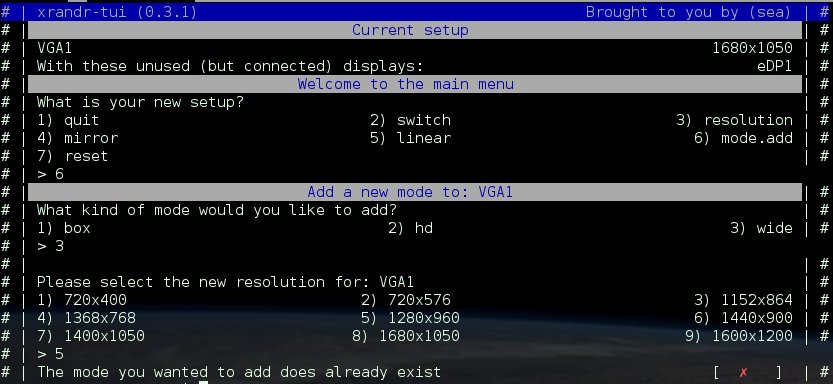
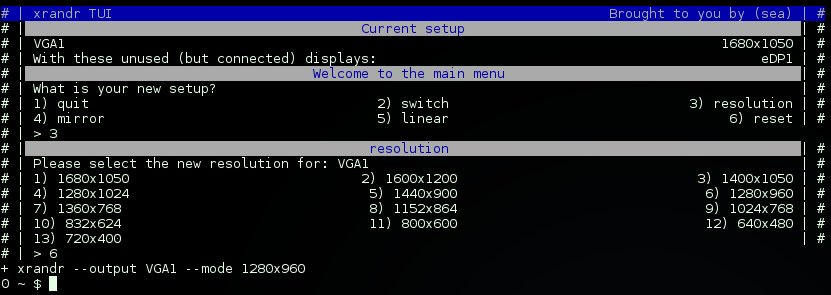
Have a look at xrandr-tui, if you do not want to type in those commands:

More functions are planned for the future, but first some optimizations for what currently is have to be applied.

It is meant for the use with WMs (Awesome, I3,dwm, etc) as it lets you set a base config, which will be used for:

xrandr-tui --switch
xrandr-tui --reset
xrandr-tui --mirror
Keep in mind, calling xrandr-tui by itself, will let you customize the task every time.
Whereas the quickaccess (arguments) will rely on the configuration file.
The screenshots you see here, are from xrandr-tui called without arguments.

You can even add and remove new/old resolutons:

Links

Montag, 14. Dezember 2015

GNU rejected TUI, for the moment

Hello everyone

As TUI can show its true power only when it is already installed on your system, so one could simply share the scripts that  rely on TUI, just like one shares any bash or other shell script, I wanted to become part of GNU.

That is no easy task, specialy if you come from a 4 year old project that hasnt had this goal from start.
So, for the past 10 months, its been in the GNU Evaluation queue and just until a day ago it look very promising.

However, it got rejected for the moment, as more user feedback is wanted for them to evaluate the need/profit of making TUI part of the GNU family.

With one of the arguments beeing that we would need some user feedback for further evaluation.

That is, because TUI has a new approach to the terminal...
An approach mainwhile quite the same, but also quite different.

In the beginning, I wanted the 'ultimate' dir/menu browser for (a single specific) directory based script project/s.
In the end I extracted those functions as I wanted to have the scripts provided in named directories to look/match the containing 'ultimate' menu, so I made them individual commands.

Due to this change, one can also create great (single file) wizzards or wrappers around other cli/clu applications or make tools that act (but dont look like) 'ip' or 'iw' commands, just for your custom directory-tree structure.

It comes with many commands/functions for often used tasks, such as tui-yesno, tui-select, tui-read, as well as nice optical commands such as tui-header and tui-title.

As it is a command and line-based-output framework, it might look weird if you just try a single command.
To get started - once installed, you might want to check:
tuirc samples
tuirc provides
To get the manual, please check either:
info tui
tuirc info
tuirc html  # Only if you used "make install all"
I'm asking here for this required feedback:
  • Which OS/Distro?
  • Does Installer work?
  • Does running 'tuirc' raise any, and if - what kind of - error messages? (Besides initial creating of user configuration)
  • Any other errors/bugs/unexpected behaviour you came along?
Additionally according to your skill, time and preferences:
  • What are our thoughts about the 'tuirc samples'  and info page?
  • Did you find any security bugs? - have any advice how to fix them?
Get it from: https://savannah.nongnu.org/projects/tui/
Issue is, all i can say for sure is that it runs well on my system.
I'd very much like to have confirmed reports on which OS or Distro it installs and runs well or not.
That is also required to get it working for that OS/Distro, eventhough most of them work alike, there are differences i might not be aware to catch and handle (properly) without reports and hints how its done on your OS.

Thank you in advance for sharing your thoughts about TUI.
Samstag, 21. November 2015

Two advanced simple bash menus

Many times one comes along a situation one wants to present a menu.
There are many ways to achieve this, none is wrong, none is right - each has its own value for its own situation.
However, to maintain or extend an existing menu can be hard to manage, at times.

I'd like to present you two of my favorite menu styles/types.
Hope you like them. :)

Variables:

Lets say you have a bunch of lists to handle, that you would like to present as menu...
It takes the variable prefix BUY_ and lists only the 'suffix' as menu content.
Simply add a new variable, and it will be listed in the menu.
Simply rename an existing variable, and as long the prefix BUY_ exists, it will be applied to the menu.
## Uncomment the variable assignments, to extend the menu
## Alll the menu 'management' can be done 'up here'
    BUY_FRUITS="apple banana kiwi"
    #BUY_PROTEIN="steak lenses"
    #BUY_DRINK="water milk limo"

## Expand/List all variables starting with BUI_
    MENU="${!BUY_*}"

## Loops the menus
while :;do
    echo "What variable to expand?"
   
    ## Cut of BUY_ from all (//) items of the list MENU
    select item in ${MENU//BUY_} Quit;do break;done
   
    ## Let the user Quit the loop
    [ Quit = $item ] && break
   
    ## RE-append the leading BUY_ variable prefix
    sel_item=BUY_$item
   
    ## Finaly expand / list the content of sel_item (BUY_$item).
    ## These 2 echo's should replace your function
    echo "${!sel_item}"
    echo
done

Array:

Lets say you have a bunch of tasks which you want to describe, and you know you might require to change the description.
This way, you only need to change the description in the array, and it keeps working.

    # Make sure no entries remain from possible previous runs
    unset MENU
   
    # Fill the values
    MENU[0]="First menu entry"
    MENU[1]="Menu entry one"
    MENU[2]="All good things are three"
   
    # Let the user select
    select choice in Quit "${MENU[@]}";do
        # Act accordingly
        # Its recomended to call functions from here, so the menu remains 'over-see-able'
        case "$choice" in
        Quit)        break        ;;
        "${MENU[0]}")    echo "first"    ;;
        "${MENU[1]}")    echo "second"    ;;
        "${MENU[2]}")    echo "third"    ;;
        esac
    done
Have fun tweaking!

Dienstag, 29. September 2015

Almost there...

Oh yeah, i'm happy already, allthough it has not yet passed evaluation.

What i'm talking about?
I'm talking about TUI - Text User Interface for scripts, which has reached 0.8.9-GNU-RC16 yesterday evening, and if everything works out as expected, it will reach "GNU TUI 0.9.0" this week.

I've been using TUI already for about 3 years for my own 'production', but by now, it has achieved a state that deserves the label 'stable'!

The feedback, so far, has been good and promising.

What to expect when it passes the evaluation?
I plan to move the project home to: http://www.gnu.org/software/tui to share the texinfo manual and to be the first and primary point of announcements regarding it.

Obviously i'll post here about it too, but more in a human-speaking way, and less technical as there.

Oh im so excited, that i just cant hide it...
*dance dance*

Montag, 3. August 2015

Yet Another Simple Script Installation

Got a cool script, and now need an installation script?

YASSI helps you :)
Inspired by the powerfull, but complex, GNU Autotool's, i've written this single script to handle this.

Main benefit?
It requires just a single configuration file.

Main drawback?
Its just to place the files, it does NOT do ANY compiling.

Read all about it, in the README.md

Samstag, 30. Mai 2015

One for between

The is a simple example how to read directly from a list file and check if that variable exists as directory.
If that is true, if writes to the tasklist, if not, it writes to another list.

Since one can pass multiple arguments to touch, one can even use parameter expansion to create multiple files at once.

#!/bin/bash
DATA="$HOME/data"
LIST="$DATA/mylist.txt"
JOB_NO="$DATA/job_no.txt"
JOB_YES="$DATA/job_yes.txt"

[ -d "$DATA" ] || mkdir -p "$DATA"
touch $JOB_{NO,YES} $LIST

while read dirfolder
do    [ -d "$dirfolder" ] && \
    echo "$dirfolder" >> "$JOB_YES" || \
    echo "$dirfolder" >> "$JOB_NO"
done<"$LIST"

Have fun

Dienstag, 26. Mai 2015

Background jobs, exit status

Figured another way to get an exit status of a job ran in background.

Obviously, these examples are simplified.
Each first of the two, is the 'one-liner' and the 2nd code box shows the structure with idention.

1) In this first one, we're sending the output of the background job into a variable, which we echo at the end.
This works, but doesnt really take advantage of a 'background' job.
ret=$(( sleep 2 ; [ -d not-existing ] ; echo $?) &)
echo $ret
ret=$(
    (
        sleep 2
        [ -d not-existing ]
        echo $?
    )&
)
echo $ret


2) This one applies alot more to what one usualy expects as a background job. (AFAIU) mkfifo lets the read-command wait until something is written to its passed file.

tmp=~/.cache/$$~ ; mkfifo "$tmp"
( sleep 10 ; [ -d not-existing ] ; echo $? > "$tmp") &
read RET < "$tmp" ; [ "$RET" = "0" ] && echo "GOOD!" || echo "BAD"
rm -f "$tmp"
tmp=~/.cache/$$~
mkfifo "$tmp"
(
    sleep 10
    [ -d not-existing ]
    echo $? > "$tmp"
) &
read RET < "$tmp"
[ "$RET" = "0" ] && echo "GOOD!" || echo "BAD"
rm -f "$tmp"
3) And to close the top 3, my most used code of these three.
This one loops while the background job is active and prints dots while its running. One could replace the printed string to update the text accordingly.

tmp="~/.cache/$~"
( sleep 5 ; [ -d not-existing ] ; echo $? > "$tmp") &
pid=$!
while ps $pid 1>/dev/zero;do sleep 0.5 ; printf ".";done
cat "$tmp"
tmp="~/.cache/$~"
(
    sleep 5
    [ -d not-existing ]
    echo $? > "$tmp"
) &
pid=$!
while ps $pid 1>/dev/zero
do
    sleep 0.5
    printf "."
done
cat "$tmp"

Last but not least, i'll have a tool to help with such a task.
Its called: tui-psm, which names Text User Interface - Paralell Script Manager.
You can pass as many scripts as an array can hold, and limit the paralell executed scripts to any number you want (5 is default).
tui-psm script1.sh script2.bash script3.csh

But it can more, for example, if you need at least 3 scripts to be executed successfully before you attempt to run script 5, this could be your approach:
tui-psm -cq script1.sh script2.bash script3.csh ./script4.zsh
[ $? -ge 3 ] && ./script5.ash

Hope this helped.
Have fun scripting!

Montag, 25. Mai 2015

Taming the beast, TUI back to stable

Now after the big excitement of the successfull changes to use an invidiual rc file for all its used variables, basic usage seems to be back to normal again.

It is causing a rush to figure one successfully installs the bash completition, accidently to a wrong and non-working path.

But this massive change also helped me to figure out which internal variables to share and which not, so i've added the function 'provides' to figure that out.

tui provides
Will print a hughe and long list with all the variables used internaly and which you may use as well.

If you
source  tui
you'll have all of those variables available, but sourcing just the rc file, and the wanted file providing the variables you want can increase usage speed.
source ~/.tui_rc || . tui
source $TUI_FILE_{APPS,SETTINGS}

Also several small hotfixes, of which i was sure i have had applied already 6 months ago....

Hope you like it, enjoy! :)

Freitag, 22. Mai 2015

TUI 0.8.0-2, The RC File release

Get it here:
https://github.com/sri-arjuna/tui/releases/tag/v0.8.0-2

Read about it here:
http://www.unix.com/shell-programming-and-scripting/253496-tui-text-user-interface-framework-scripts.html

Also the installation script has changed:


Hope you like the changes.
Enjoy! :)

Mittwoch, 6. Mai 2015

Get the extension of a filename

Every now and then, one needs to decide upon a file its extension what to do.

This is what i've added as tui-str-extension:
out=""
FN=$( echo "$1" | sed s," ","",g)    # Remove any spaces and make it a single string
for chance in $(echo "$FN"|sed s,"\."," ",g)    # Use dots as string seperators
do    out="$chance"
done
if [ "$out" = "$FN" ]
then    echo ""
else     echo "${out%\ /}"     # Remove any tailing or single space
fi
Hope you like it :)

Dienstag, 7. April 2015

Building FFMPEG

Been on in all easter days, it pulls in so many different applications, codecs, drivers and whatnot.
Just imagine, the temporary build path contains more than 500mb of data, compared to the final binary of ffmpeg, which is not even 500kb in size when done.

Yesterday evening i was finaly able to build the (my) first ffmpeg.
Today when i wanted to redo it, starting with 0, figured many of the build steps got accidently optimized for rerunning, which means, some of the parameters for the first 'contact' got removed and have to be readded.

Eventhouth its a smaller script, about 700 lines of code, not beeing familiar with the building process of that many applications is not a small challenge.

But i just encoded my first x265 video last night, and i have to say, the quality is great, eveb more when comparing to the filesize.

That was a good motivator, to keep me going for the still missing (failing) things, such as, but not limited to:
  • vorbis
  • webp
  • v4l
  • ass
  • srt
  • rtmp
  • speex
  • wav
  • dc1394
Once it does what i want, this script will be part of VHS, as its a handler for ffmpeg it makes sense to let it build the tools it depends on.

I'll keep you posted :)